
Embracing the New Collapsible Navigation Menu
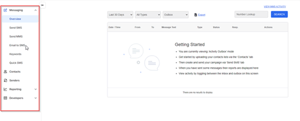 The latest Comrad SMS user interface upgrade introduces a significant change that users will find innovative and practical: the collapsed navigation menu. By moving the navigation menu from its traditional spot at the top of the screen to the left-hand side, Comrad SMS has created a more streamlined and less cluttered interface.
Streamlined Access to Messages and Responses
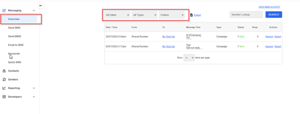 Navigating through messages and responses has never been easier with Comrad SMS's updated interface. The "Overview" button, prominently positioned, grants users seamless access to their sent and received messages. This feature continues to support existing filtering options, ensuring that users can efficiently manage their communication without adapting to new processes.
Enhanced Account Settings and Billing Experience
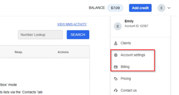 Account management is simplified with the updated Comrad SMS interface. Users can now access account settings and billing options through the "User" dropdown menu, conveniently located in the top right corner of the webpage. This update consolidates essential account functionalities into a single, easy-to-find location.
Visual and Functional Updates: From Colors to Features
The interface now features a light blue color theme across components such as buttons, dropdowns, and toggles. This subtle change enhances visual appeal while maintaining a professional look, contributing to a more pleasant user experience.
Moreover, the renaming of "Numbers" to "Senders" better reflects the function of Alphanumeric Sender IDs, aligning terminology with user expectations.
While support for the Quick SMS Bookmarklet application has been discontinued, the updated features offer a more cohesive and efficient experience. These visual and functional updates demonstrate Comrad SMS's commitment to user-centric design, ensuring that the interface meets practical needs and provides an engaging and modern experience.